Wine-Searcher
- 4.7
- Rating
- 1.00M
- Installs
- Free
- Price
 Analysis by App-foxy
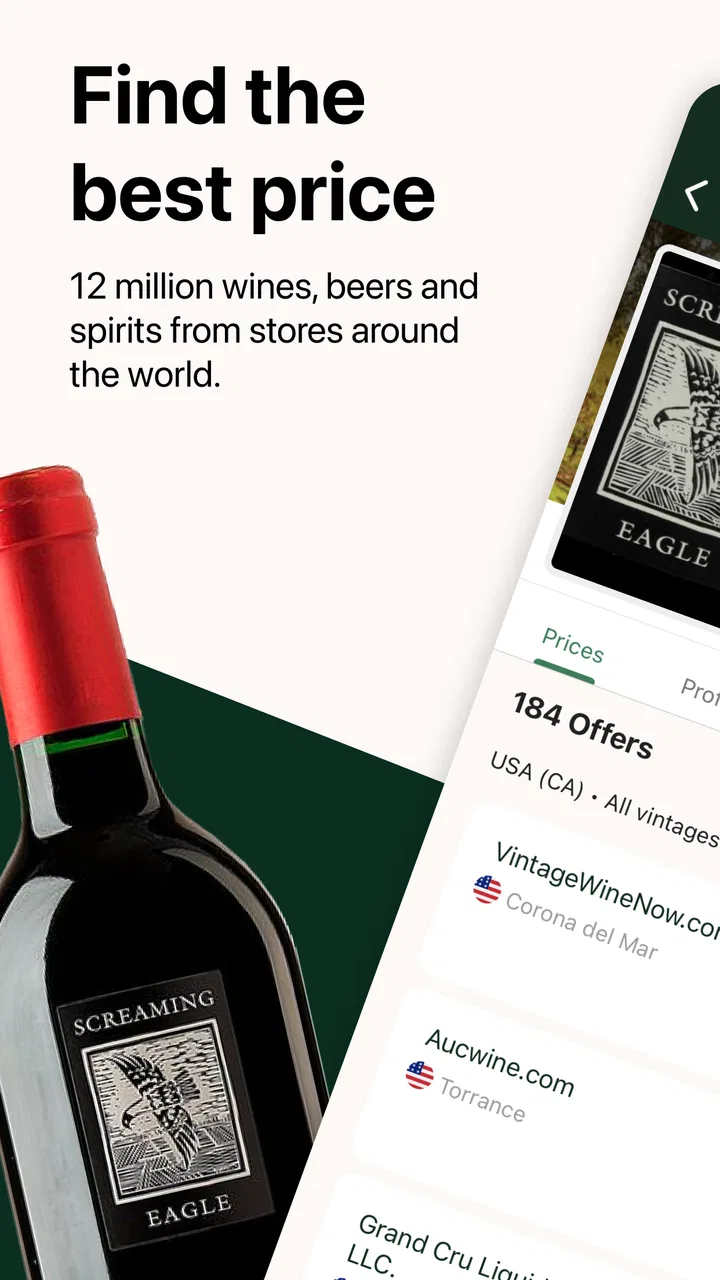
Wine buying can be surprisingly inefficient when I have to jump between a label, a browser search, several retailer pages, and a calculator before I can decide whether a bottle is worth pursuing. Wine-Searcher brings much of that work into one Food & Drink app. Its main appeal is simple: I can scan a wine label, compare available prices, and look for places selling it without treating a vague web search as the final answer.
After spending time with it, I see it as more than a label scanner. It works best as a research companion for people who already know that vintage, bottle size, region, and seller location can change the meaning of a “good deal.” The app is free to install, comes from Wine-Searcher Ltd, and has built a strong audience, with an average rating of 4.7 from around 7.4 thousand ratings and more than a million installs. That popularity makes sense, although the experience is most rewarding when I use it with a repeatable method rather than expecting one scan to make every decision for me.
How I use Wine-Searcher from label to buying decision
I use the scan as the opening move, not the buying decision: first I check that the result matches the producer, vintage, and bottle format, then I compare only offers that make sense for where I am. That small pause helps me avoid treating a tempting price as a true match. Next, I look at the setup checks that can make the whole process smoother.
You May Also Like

 Blood Strike: 2.5 Anniversary
Blood Strike’s Loadouts Turn Every Drop Into a Tactical Gamble
A close look at Blood Strike’s custom loadouts: how fast access to signature weapons reshapes its battle royale rhythm, rewards preparation, and narrows the gap between fights.

 Pandora - Music & Podcasts
Pandora’s Music Is Easy to Start, but Harder to Recover
Pandora’s strength is its low-effort path from a seed to a station. Its weak spot is how much confidence it asks you to place in connection, setup, and quiet recovery.

 8 Ball Pool
 Is Built on Rivalries, Rematches, and Routine
A close look at the rivalries, rematches, shared routines, and unanswered safety questions that turn a quick pool match into a persistent mobile community.

 Samsung Music
’s Quiet Strength Is Playing What You Already Own
Its reach comes less from spectacle than from dependable access to a personal library. That simplicity is both the app’s strongest retention engine and its ceiling.

 AccuWeather: Weather Radar
AccuWeather Review: A Quick, Clear Forecast for Everyday Decisions
For everyday plans, the best forecast is the one you can understand quickly. AccuWeather makes rain timing, radar, and local conditions easy to act on, with a few trade-offs.

 Hill Climb Racing
Why Hill Climb Racing Still Turns Crashes Into One More Run
A tiny car, a bumpy hill and one more upgrade: Hill Climb Racing keeps resurfacing because its simple chaos makes every near-miss feel personal.
More From Our News Desk
View All News


Start with the bottle, not the price
My baseline workflow begins with the physical bottle. I open the scanner, frame the label as clearly as possible, and then check whether the result matches what I am holding. This second step matters. Wine labels can contain a producer name, a cuvée name, a region, a vintage, and a classification that look similar in a quick search. A result that identifies the producer correctly can still be unhelpful if it points to a different vintage or format.
I treat the scan as a shortcut into the app’s search, not as proof that the first result is the exact bottle. When the label is ornate, reflective, partly hidden, or printed in small type, manual searching is often the safer route. Typing the producer and wine name, then adding the vintage or region, gives me a way to correct a nearly right match. This is one of the most useful habits with the app: verify the identity before comparing the price.
Once I have the right wine, I look at the available offers as a range rather than focusing on the lowest number. A cheap listing may represent a different bottle size, an older or newer vintage, a seller in another market, or a price that becomes less attractive after delivery costs. The app helps me discover the market, but I still need to read each offer carefully and decide whether it is practical for my location.
A realistic everyday use case
Imagine I am at a restaurant or a friend’s home and notice a bottle I enjoy. Instead of trying to remember the name later, I can scan the label while it is in front of me. If the recognition is accurate, I can save the producer, region, and vintage in my notes or use the result as a starting point for a later purchase. I do not need to buy immediately, and I avoid relying on a blurry photograph taken in poor light.
At a shop, the process is slightly different. I can scan two or three candidates, compare their market positions, and decide whether the shelf price seems reasonable. I would not use that comparison to embarrass a small retailer whose costs may differ from an online seller’s. I use it to understand whether I am paying for a scarce bottle, a convenient local purchase, or simply a large markup.
For a dinner party, the app is useful before shopping rather than only inside the store. I can research several bottles, compare where they are sold, and make a shortlist. That reduces the temptation to choose solely from a shelf label or a sales recommendation. It also gives me a way to distinguish a wine that is widely available from one that may require patience or a specialist retailer.
What the results are really good for
The strongest part of the experience is discovery. A bottle name that means little to me on a shelf can lead to a wider view of producers, vintages, and sellers. I can use a known wine as an anchor, then explore related options by region or style when I want something similar but less expensive. This is more useful than a basic barcode lookup because wine shopping is often about context, not just identification.
The comparison view is also valuable for checking whether a price deserves more investigation. If several offers sit close together, I feel more confident that the bottle is being sold within a normal range. If the spread is wide, I slow down and inspect the details. That spread can signal differences in shipping, availability, bottle format, or market, so I regard it as a prompt for questions rather than an automatic recommendation.
Settings and habits worth checking
The first setting-related habit is making sure the app is comfortable to use before I need it in a shop. Camera access is central to scanning, so I check that permission when setting up the app rather than troubleshooting it beside a crowded shelf. I also make sure the phone can focus on labels and that I have enough light. A clean, steady image improves the starting point more than repeatedly tapping the scan button.
Location and market context deserve attention too. Wine prices are not universal, and a result from the wrong market can distort my expectations. I check the destination and seller details before treating an offer as actionable. If I am traveling, I use the app for research but avoid assuming that a listing can be delivered to my current location. This is a practical limitation of wine comparison generally, not a failure of the scanner.
Notifications and account-related choices are worth reviewing according to how often I shop. A frequent collector may appreciate staying informed about wines or searches, while a casual drinker may prefer a quieter phone. I do not turn on every prompt automatically. The app is most helpful when it supports a buying routine instead of becoming another stream of alerts.
Because the app is free, it is easy to install for occasional research. It also includes optional in-app purchases ranging from $5.99 to $98.99 per item. I would approach those purchases as a deliberate decision rather than part of the basic scanning workflow. If my needs are limited to identifying bottles and checking prices, I first judge the free experience on its own. Users who want additional paid capabilities should inspect the purchase screen and decide whether those tools match their habits.
Faster patterns for regular users
The quickest reliable pattern I found is a three-pass check. First, scan or search the bottle. Second, confirm producer, wine, vintage, and size. Third, compare a small number of realistic offers instead of endlessly browsing every result. This keeps the app from turning a simple purchase into a long research session.
I also separate “interesting” from “buyable.” A wine can be worth tracking even when no current offer suits me. In that case, I record the exact identity and return later rather than forcing a purchase from an inconvenient seller. This habit is especially useful for unusual bottles, where the first available listing may not be the best practical choice.
When I am comparing several bottles in a shop, I photograph or note the shelf labels before scanning. That gives me a record of the local price and prevents memory from blending one bottle with another. I then compare like with like: the same vintage where possible, the same volume, and a seller whose delivery terms make sense. The app supplies speed, but this small bit of organization supplies accuracy.
Another efficient pattern is to search by producer and region when label recognition struggles. Decorative labels, foil, glare, and unusual typography can make camera-based identification unreliable. Manual search is not a defeat; it is the right tool for the situation. I find that adding one distinctive detail at a time works better than typing a long guess that may contain a spelling error.
Where it differs from ordinary alternatives
The usual alternative is a general search engine. That can find a retailer quickly, but it often mixes reviews, restaurant menus, old pages, and unrelated bottles with the product I actually want. Wine-Searcher gives the task a wine-specific structure, which makes comparison more focused. I spend less time translating a generic result into a useful buying decision.
A retailer’s own app or website can be better when I already know where I want to shop. Retailers usually provide clearer information about local stock, delivery, collection, and final checkout costs. Wine-Searcher is stronger earlier in the process, when I am deciding which bottle to pursue and whether different sellers are worth considering. I would use both rather than treating them as competitors in every situation.
Wine label databases and tasting-note apps can be better for learning about flavor, food pairing, or the producer’s background. Wine-Searcher’s practical strength is the path from recognition to availability and price. If my main question is “Will this work with grilled fish?” I may need another source. If my question is “What exactly is this bottle, and where might I find it?” this app is much closer to the answer.
Advanced limits that experienced users should understand
The app cannot remove the uncertainty built into wine commerce. Stock changes, listings can age, and a displayed price may not be the amount I finally pay. Delivery, taxes, minimum orders, and local regulations can affect the real cost. I therefore treat the comparison as market intelligence, not a guaranteed checkout quote.
Vintage matching is another serious boundary. Two bottles from the same producer and appellation can be meaningfully different when the vintage changes. If the scan lands on the producer but not the exact year, I do not use that result to judge a shelf price. I search again with the vintage included and inspect the bottle size before drawing a conclusion.
Availability can also be misleading for people who want immediate local pickup. A listing may be useful for discovery without being convenient for me. This is where a nearby shop’s own stock system can beat a broad comparison service. I would skip the app as my main tool if I only buy familiar bottles from one local retailer and never compare alternatives.
Newcomers should also resist the idea that the lowest listed price is automatically the best value. A seller with a higher sticker price may offer a practical delivery option, while the cheapest listing may involve costs or conditions that make it less attractive. The app helps reveal those possibilities, but it does not replace judgment about logistics and trust.
Who will get the most from it?
I recommend it most to curious drinkers, collectors, travelers, and anyone who regularly encounters unfamiliar bottles. It is especially useful when I want to turn a label spotted at a restaurant, tasting, or friend’s house into a concrete research trail. People who buy across different regions can also benefit from seeing how availability and pricing vary between sellers.
It is less compelling for someone who wants only simple tasting notes, cocktail recipes, or a grocery list. It may also feel excessive for a person who buys the same inexpensive wine every week from the same store. In those cases, a retailer app, a notes app, or a straightforward search may be faster and less distracting.
The Mature 17+ content rating is worth keeping in mind for households where age-appropriate app access matters. The app is free to download, but optional purchases mean I would still review the purchase controls on a shared device. Those details do not change the core usefulness of the scanner, yet they are part of deciding whether it fits a family phone or a personal research device.
My verdict after building a repeatable routine
Wine-Searcher succeeds when I use it as a disciplined bridge between seeing a bottle and making a sensible buying decision. Scanning is the inviting feature, but confirmation, market context, and a realistic look at the offer are what make the results useful. The app’s current version, 7.19.0, reflects a mature product rather than a novelty, and its long presence in the category helps explain why it feels designed around practical wine research.
My advice is to install it if you often ask where a wine came from, whether a local price is reasonable, or how to find a bottle again after trying it. Build the habit of checking the exact vintage and format, use manual search when the camera struggles, and treat listed prices as comparison points rather than promises. Those three choices prevent most of the frustration I encountered.
I would not make it my only wine resource. Retailer pages remain better for final delivery and stock details, while specialist educational tools may offer deeper tasting guidance. But for moving from label recognition to a broader view of sellers and prices, it is one of the more focused options I have used. Its real advantage is not the scan alone; it is the repeatable workflow that follows the scan.
For experienced users, that workflow is the difference between a quick novelty and a genuinely useful shopping tool. I can scan when speed matters, search manually when precision matters, compare only equivalent bottles, and stop once I have enough information to choose. Used that way, Wine-Searcher earns a place on my phone whenever wine discovery and buying decisions overlap.
FAQs for Wine-Searcher
01What is Wine-Searcher, and what can I use it for?
Wine-Searcher is a mobile companion for finding wines, spirits, and related products from retailers, restaurants, and merchants. After testing its search tools, I found it especially useful for comparing prices, checking availability, exploring producer information, and reading community or critic ratings where available. It is designed primarily to help users research and locate bottles rather than replace a dedicated shopping or delivery service.
02Can Wine-Searcher show prices and availability in my location?
Yes, Wine-Searcher can display listings based on a selected location, helping you compare prices from nearby and online merchants. However, results may differ according to your country, postcode, regional regulations, merchant participation, and inventory updates. Before relying on a listing, check the seller’s page for current stock, shipping costs, taxes, vintage, bottle size, and delivery restrictions, since app information may not always update instantly.
03Does Wine-Searcher allow me to buy wine directly through the app?
Wine-Searcher generally works as a search and comparison platform, connecting users with merchants that may sell the selected product. Depending on the listing and region, you may be redirected to a retailer’s website or contact the merchant to complete the purchase. The final transaction, payment, shipping, returns, age verification, and customer service are normally handled by the individual seller, not by the app itself.
04What information does Wine-Searcher provide about a wine or spirit?
A product page can include details such as producer, region, grape variety, vintage, bottle size, merchant offers, price comparisons, and ratings or reviews from recognized sources and users. The amount of information varies considerably between products and markets. I recommend checking the vintage and format carefully, because the same label may appear in several versions, and product descriptions can depend on data supplied by merchants.
05Is Wine-Searcher free to download, and are there any limitations?
Wine-Searcher can generally be downloaded without an upfront cost, although availability of features may depend on the platform, region, account status, and the service’s current subscription or advertising model. Free access may include product searches and merchant comparisons, while some advanced tools or an ad-free experience could require payment. Also remember that prices shown in the app do not necessarily include shipping, taxes, or other purchase fees.
Pros
- Compares prices from retailers in multiple countries.
- Provides detailed tasting notes and critic scores.
- Includes winery
- vintage
- grape
- and region information.
- Useful auction and marketplace listings for rare bottles.
- Lets users save wines and track personal preferences.
Cons
- Availability and prices can vary significantly by location.
- Some listings may be outdated or unavailable when opened.
- Advanced search filters may feel overwhelming for beginners.
- Certain retailer details require visiting external websites.
- The app is most useful in regions with broad retailer coverage.

Wine-Searcher
Gallery